Overview
What it Does
Blocking rules are guardrails that define which findings should fail a pull request check or CI pipeline. This helps ensure that your codebase adheres to your organization’s security and quality standards. You can create three types of blocking rules:- Code Vulnerability Rules: Block PRs based on security vulnerabilities, code-quality findings, or both
- Dependency Vulnerability Rules: Block PRs based on vulnerable dependencies found by SCA scanning
- License Compliance Rules: Block dependencies with specific SPDX licenses or license families
Who it’s For
Blocking rules are primarily designed for:- Development teams
- Project managers
- Security professionals
Key Features and Benefits
Enforce Coding Standards
Enforce Coding Standards
Define rules based on Common Weakness Enumerations (CWEs) to block pull requests that introduce specific types of vulnerabilities or code quality issues.
Customize Urgency Levels
Customize Urgency Levels
Assign urgency levels (e.g., critical, high, medium, low) to different types of issues, allowing you to prioritize and handle them accordingly.
Filter Dependencies by CVSS
Filter Dependencies by CVSS
For dependency vulnerability rules, define an inclusive CVSS score range to block vulnerable dependencies based on their CVSS score.
Filter Dependencies by Reachability
Filter Dependencies by Reachability
For dependency vulnerability rules that apply to CI, narrow blocking to dependencies whose vulnerable code is actually reachable from your application, so unused and unreachable packages do not fail your pipeline.
Enforce License Policy
Enforce License Policy
Block dependencies by specific SPDX license IDs or by the Copyleft, Permissive, and Commercial license families.
Project and Tag Scoped Rules
Project and Tag Scoped Rules
Apply blocking rules to specific projects, project tags, or across your entire organization, giving you granular control over which projects are subject to which rules.
Rule Management
Rule Management
Easily create, edit, and delete blocking rules through a user-friendly interface, ensuring your rules stay up-to-date with your evolving requirements.
Rule Activation/Deactivation
Rule Activation/Deactivation
Toggle the status of blocking rules to temporarily enable or disable them as needed, without losing their configurations.
Rule Types
Blocking rules support three distinct types to provide comprehensive security coverage:Code Vulnerability
Blocks pull requests based on security vulnerabilities, code-quality findings, or both.Configure by:
- Selecting an issue type: All, Vulnerabilities, or Code Quality
- Selecting specific CWE (Common Weakness Enumeration) categories
- Setting urgency/severity levels
Dependency Vulnerability
Blocks pull requests based on vulnerable dependencies found by software composition analysis (SCA).Configure by:
- Setting urgency/severity levels (Critical, High, Medium, Low)
- Or setting an inclusive CVSS score range from 0.0 to 10.0
- Optionally narrowing by reachability (CI rules only)
License Compliance
Blocks pull requests or CI pipelines when a dependency uses a denied license.Configure by:
- Selecting one or more license families: Copyleft, Permissive, or Commercial
- Entering specific SPDX license IDs, such as
AGPL-3.0
How it Works with GitHub
Prerequisite You must have installed and configured the Corgea GitHub App with appropriate repository permissions.
1
Pull Request Submission
Developer submits a pull request with code changes
2
Automated Analysis
System analyzes code changes against active blocking rules
3
Rule Validation
If violations are found, pull request is automatically blocked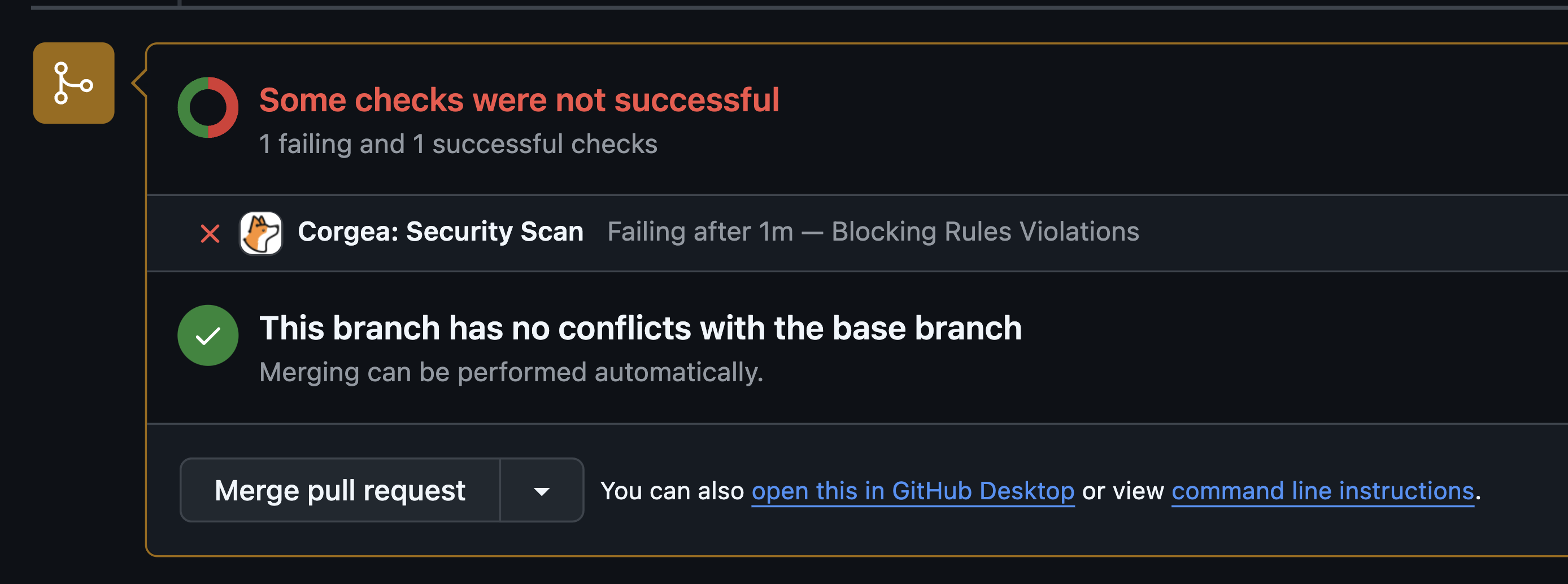
4
Developer Notification
Developer receives detailed notification about rule violations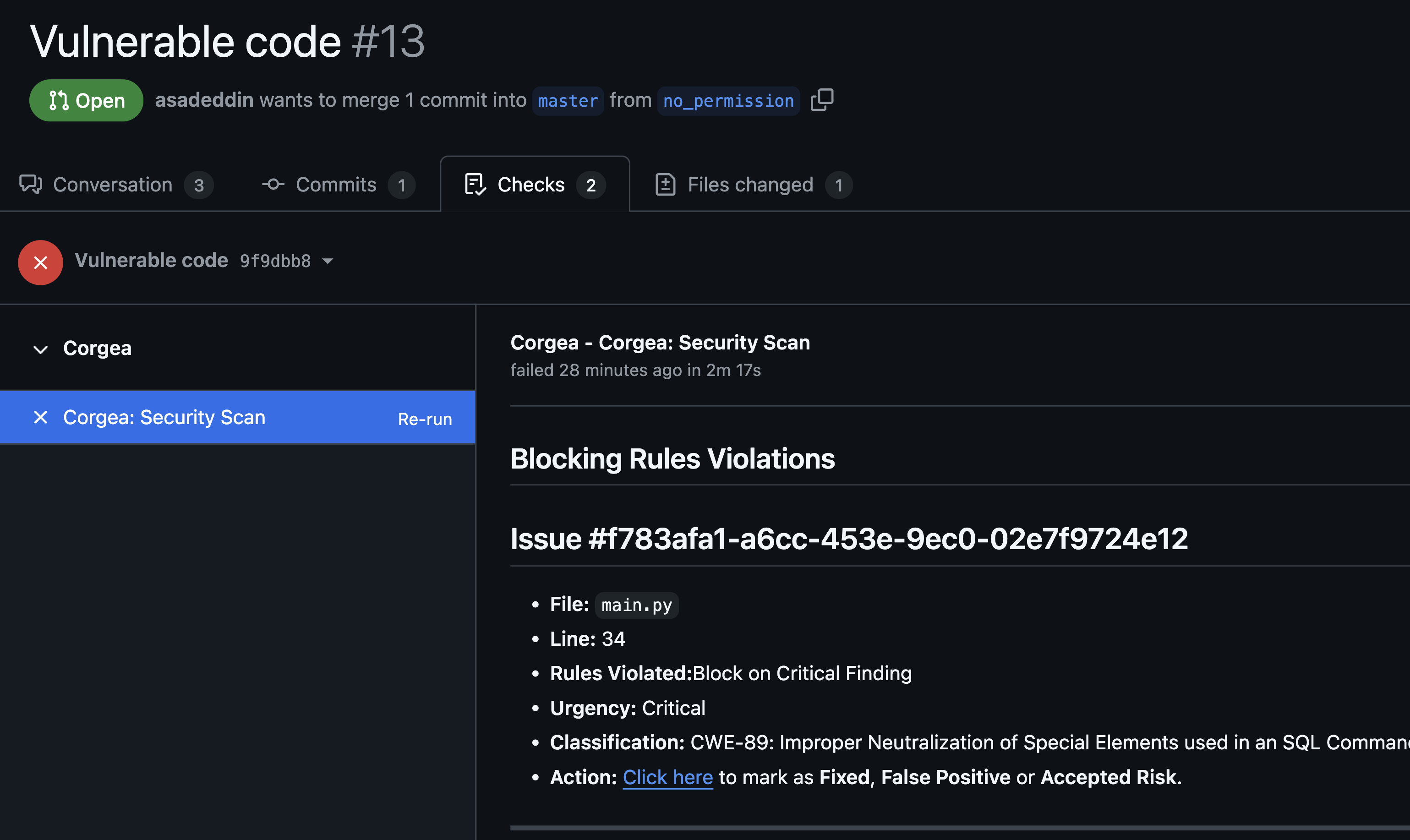
5
Resolution
Developer must fix violations and mark them as Fixed, or mark them as False Positive or Accepted Risk before merge is allowed
How it Works with Azure DevOps
Prerequisite Make sure the Azure DevOps integration with Corgea is configured and you have the necessary permissions.
1
Pull Request Submission
A developer submits a pull request with code changes in Azure DevOps.
2
Automated Analysis
The system evaluates the code changes against the active blocking rules set in Corgea.
3
Rule Validation
If violations are found, the pull request is automatically blocked.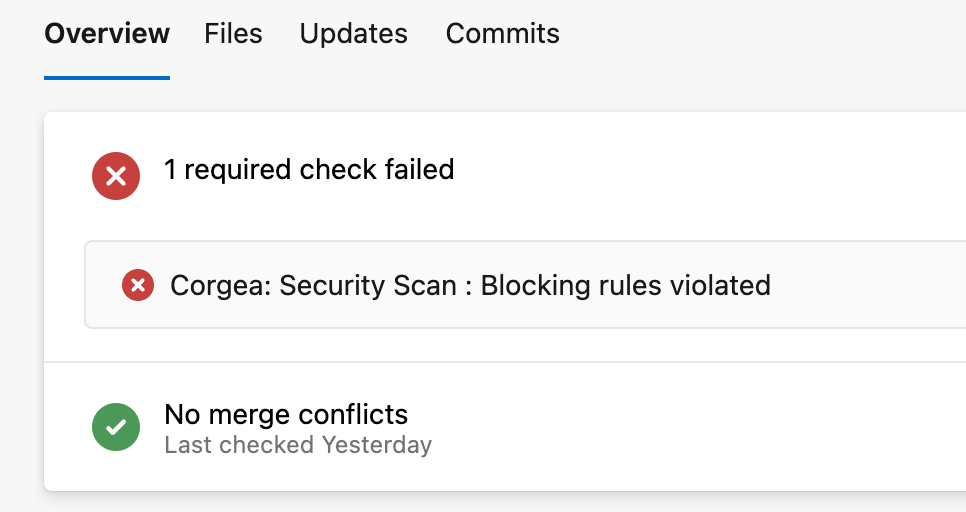
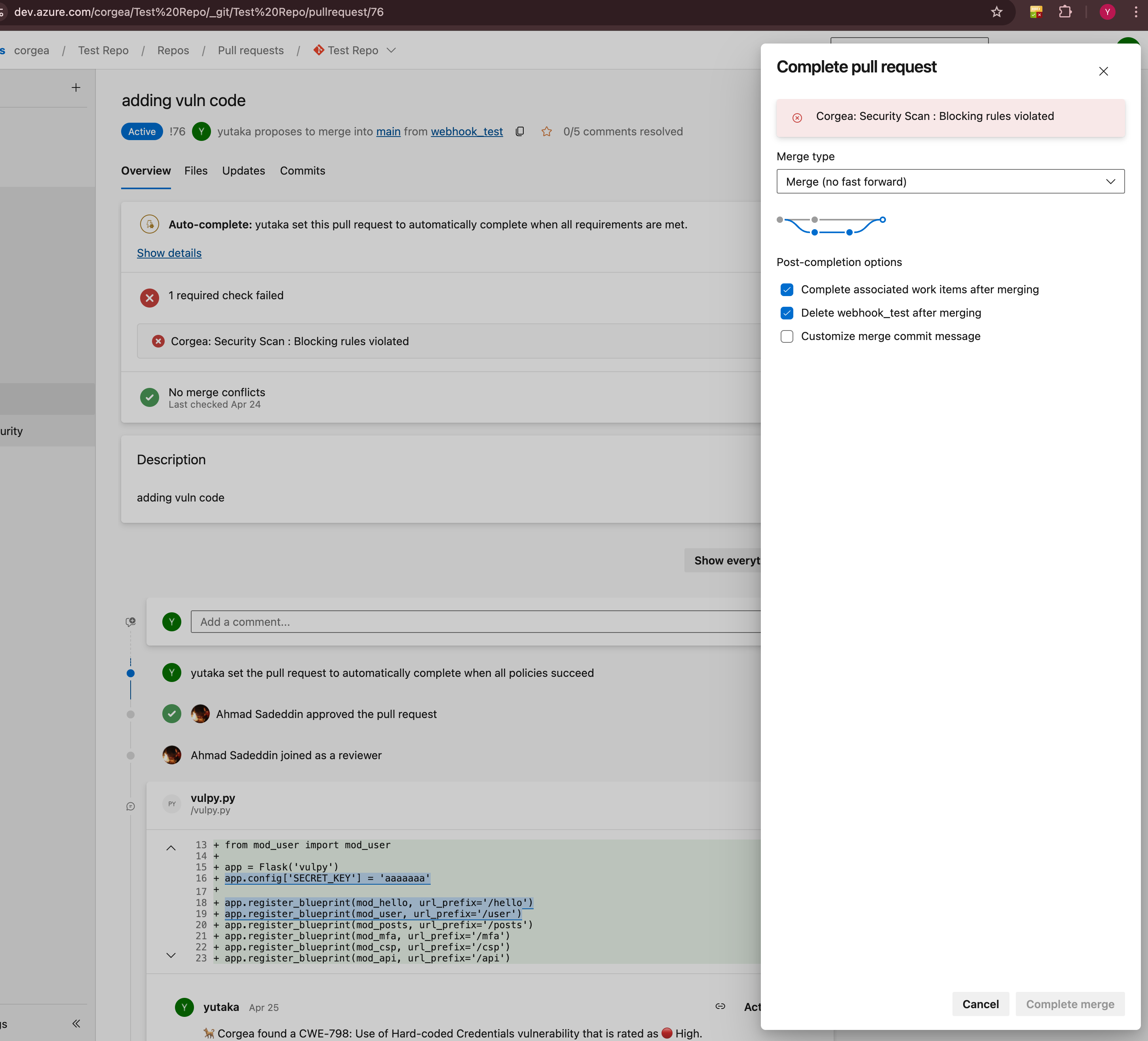
4
Developer Notification
The developer receives a link to view detailed information about the failed issues on the Corgea Scan page.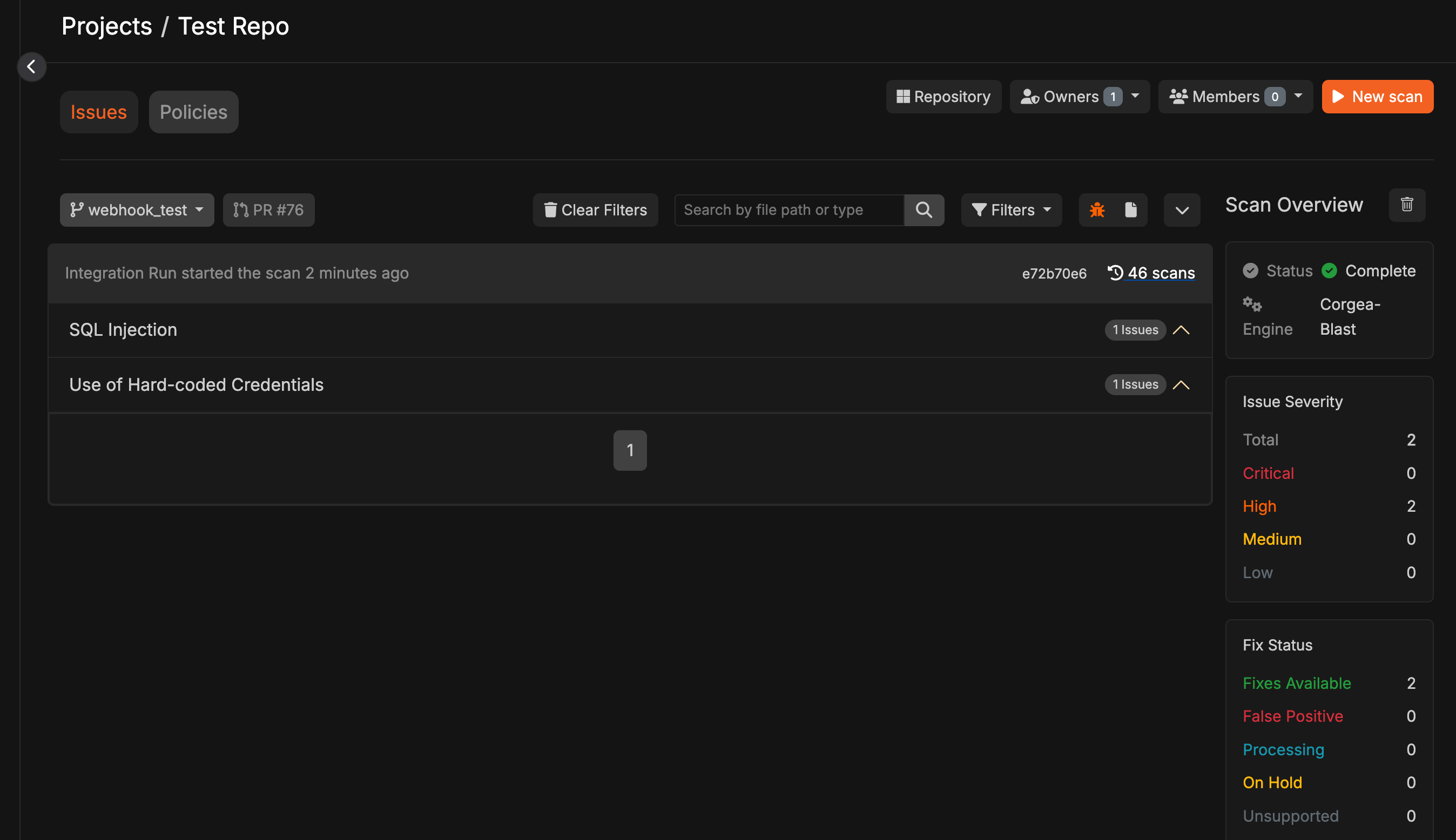
5
Resolution
The developer must resolve the violations by fixing them or marking them as False Positive or Accepted Risk before the merge can proceed.
Usage Guide
Creating a New Blocking Rule
1
Initiate Creation
Click the “Add Blocking Rule” button
2
Choose Rule Type
Select the type of blocking rule: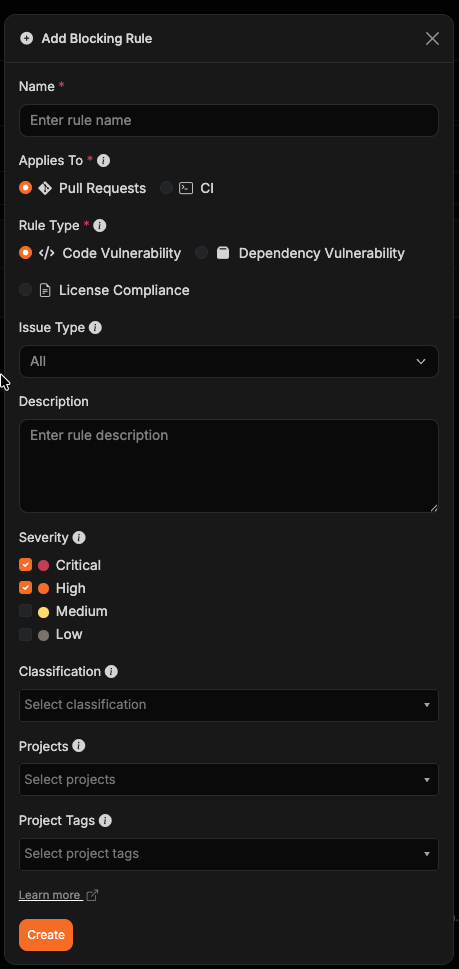
- Code Vulnerability: Block pull requests based on code security issues (SAST findings)
- Dependency Vulnerability: Block pull requests based on vulnerable dependencies (SCA findings)
- License Compliance: Block dependencies based on denied SPDX licenses or license families
3
Basic Information
Enter the rule name and description, then choose Applies To: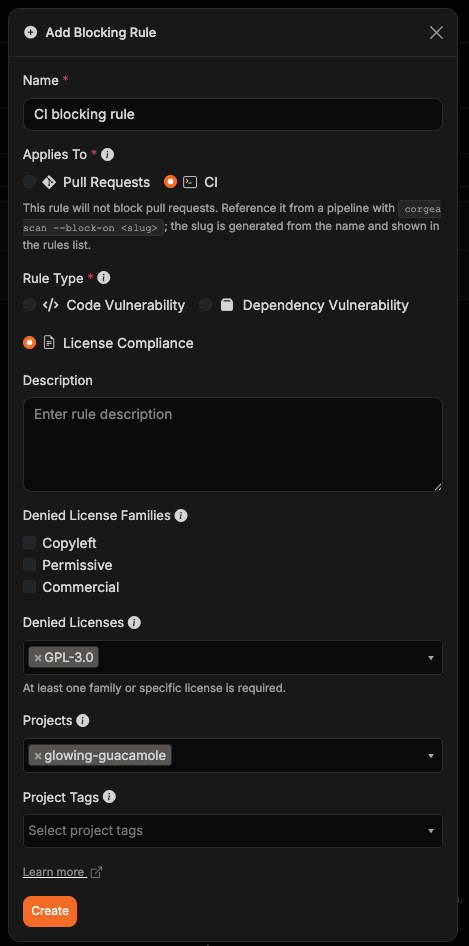
- Pull Requests automatically enforces the rule in pull request checks.
- CI enforces the rule only when a pipeline names it with
corgea scan --block-on <slug>. CI rules do not block pull requests.
4
Configure Settings
For Code Vulnerability rules: Choose an Issue Type to apply the rule to All findings, Vulnerabilities only, or Code Quality findings only. All is the default and preserves the behavior of existing rules. Then select urgency levels (Critical, High, Medium, or Low) and/or target CWEs; at least one of these must be defined for the rule to be valid.For Dependency Vulnerability rules: Choose whether to filter by severity or CVSS score. Select urgency levels (Critical, High, Medium, or Low), or enter a minimum and maximum CVSS score from 0.0 to 10.0 to block vulnerable dependencies within that inclusive range. If the rule applies to CI, you can also select one or more Reachability states to narrow it further — see Filtering by Reachability.For License Compliance rules: Select at least one denied license family (Copyleft, Permissive, or Commercial) or enter one or more SPDX license IDs. A dependency is blocked when any reported license matches a selected family or specific ID.
5
Set Scope
Choose applicable projects and/or project tags (optional). A rule applies when a project is selected directly or has any selected tag. If no projects or tags are selected, the rule applies to all projects.
6
Save
Review and click “Create”
Managing Existing Rules
Use search to find rules by name or settings, or filter the list by project tag or Applies To target. The rules table shows each rule’s slug in the ID column and surfaces the project scope, rule type, and Pull Requests or CI target under Triggers On. Select a slug to copy it for use in a CI command. Rules without a project or tag scope apply to all projects, and longer scope lists are grouped behind a +N more tooltip.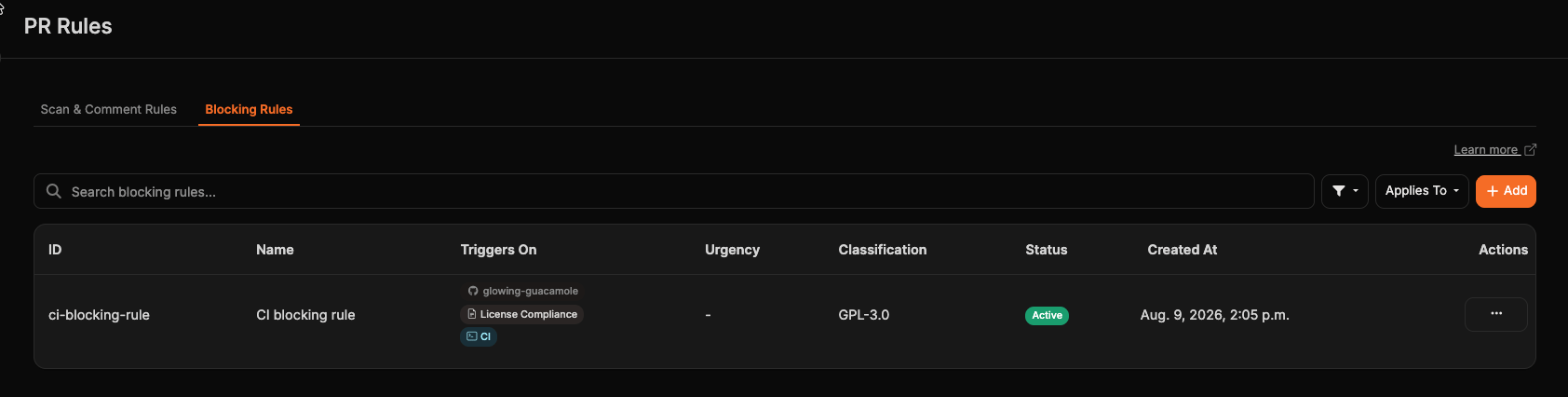
Enforcing Rules in CI
Create an active rule with Applies To set to CI, then pass its slug to the scan command. Name rules for the condition that trips them — for examplecriticals, not no-criticals — so --block-on reads as a direct assertion. --block-on requires Corgea CLI 1.10.0 or later.
--block-on is supported only by the BLAST scanner and cannot be combined with --fail or --fail-on.
- Edit Rule
- Toggle Status
- View Details
- Locate rule in table
- Click “Edit” button
- Modify settings as needed
- Click “Update” to save
Viewing Rules on scans
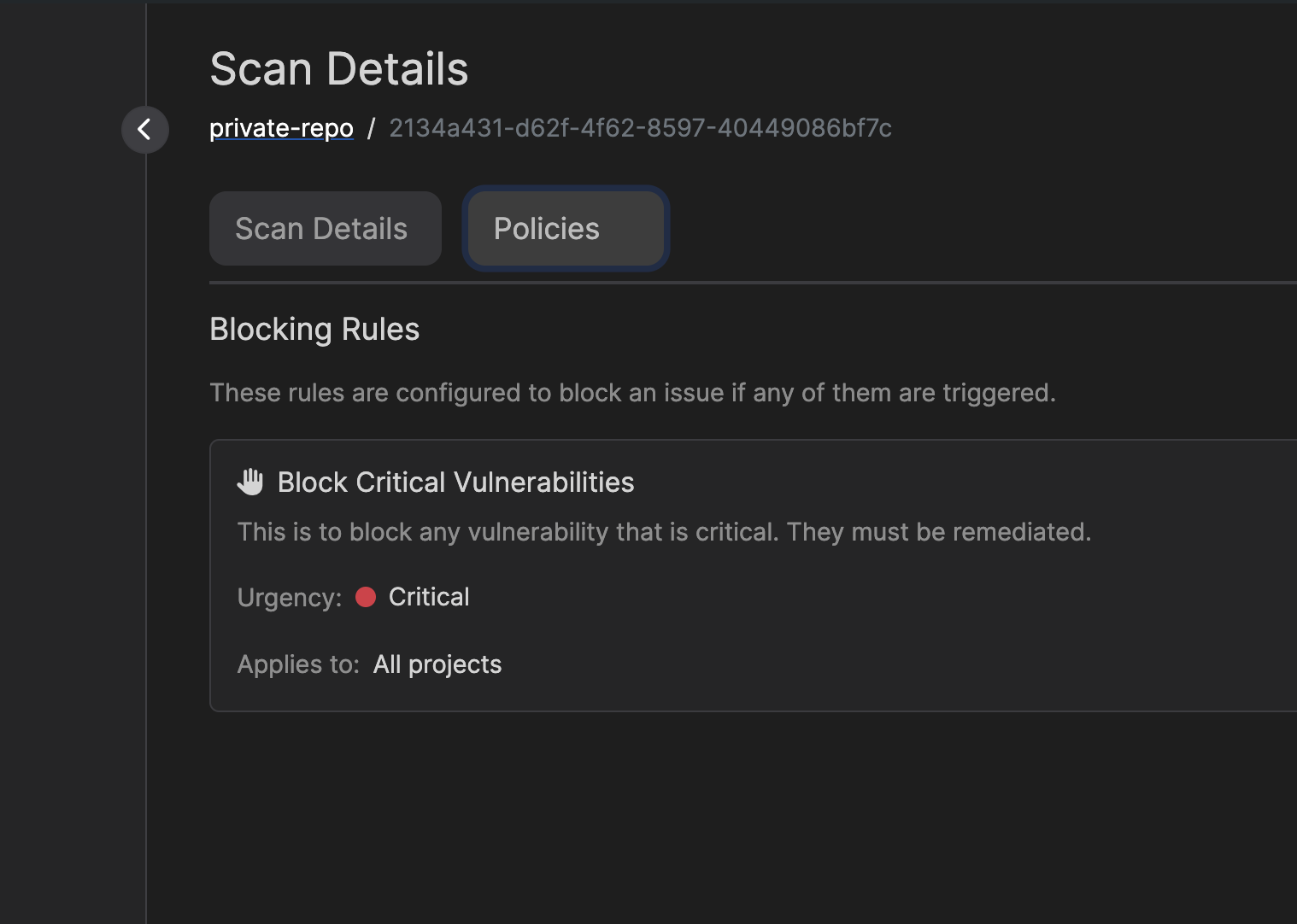
You can view blocking rules that apply to your scans in two places:- On the scan details page, you’ll see a “Blocking Rules” section showing all rules that were evaluated:
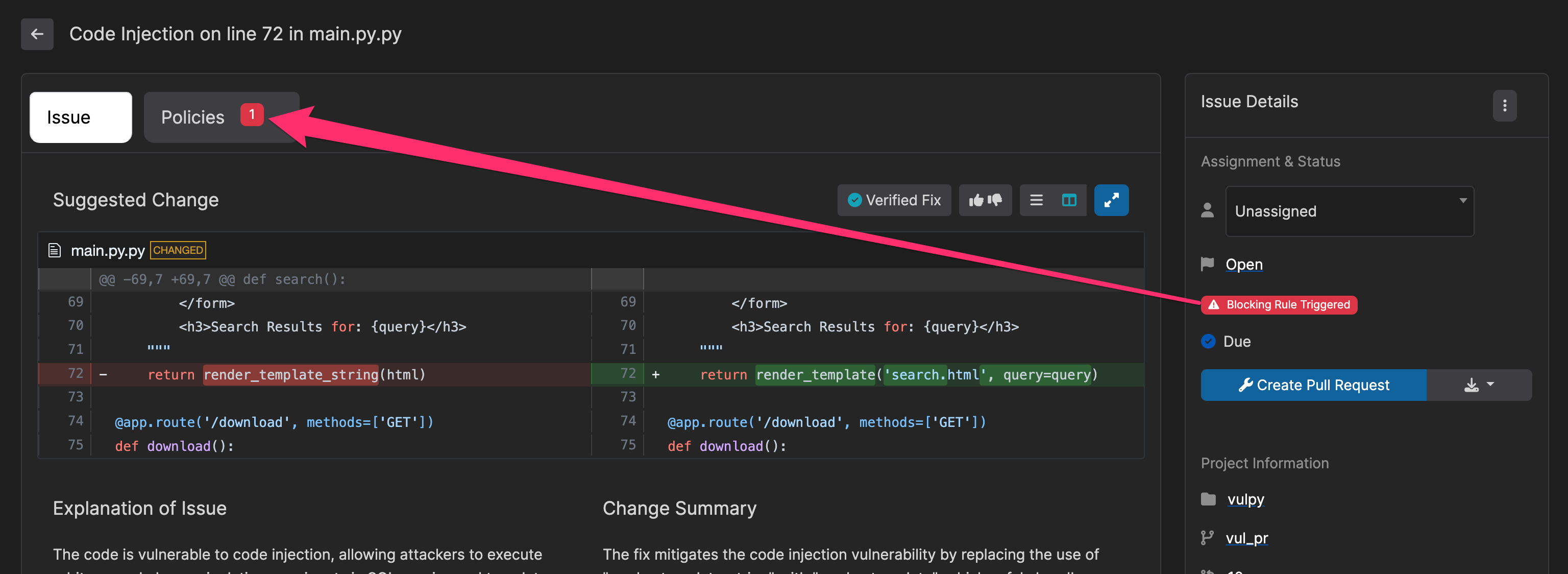
- For individual issues, you can see which blocking rules were triggered in the issue details:
Filtering by Reachability
Most vulnerable dependencies in a project are never actually exercised by your code. Reachability filtering lets a Dependency Vulnerability rule block only the findings that matter, so a critical CVE in a package you never call does not fail your pipeline.Available for CI rules only Reachability is analyzed on scans you start yourself with
corgea scan, not on the scans triggered automatically when a pull request opens. Set Applies To to CI to use this filter; the option is hidden for Pull Request rules, and reference the rule from your pipeline with corgea scan --block-on <slug>.Prerequisite Reachability requires AI-Native SCA to be enabled for your organization. Without it no dependency is analyzed, so a rule using this filter never blocks anything. The rule editor warns you when the setting is off.

The reachability filter is combined with the severity, CVSS, or Malicious filter rather than replacing it, so a finding must match both. A rule set to Critical severity and Reachable blocks only critical vulnerabilities that are also reachable. Leaving reachability empty keeps the rule’s existing behavior of blocking regardless of reachability.
Waiting for Analysis
Reachability analysis runs after the scan itself completes, socorgea scan keeps polling while it finishes rather than reporting a result immediately. Analysis is done once every direct dependency has been analyzed, typically a few minutes and at most 30.
This filter fails open. If analysis cannot finish — the 30-minute window elapses, analysis fails, or AI-Native SCA is disabled — the rule reports no violation instead of failing your build. A pipeline is only ever blocked on reachability that Corgea actually determined, never on missing analysis.
Examples
Blocking Insecure Cryptography
Blocking Insecure Cryptography
Rule Type: Code VulnerabilityCreate a rule targeting CWE-326 (Inadequate Encryption Strength) and CWE-327 (Use of a Broken or Risky Cryptographic Algorithm) with “Critical” urgency to prevent weak encryption usage.
Enforcing Code Quality
Enforcing Code Quality
Rule Type: Code VulnerabilitySelect Code Quality as the issue type, then set up a rule for CWE-398 (Indicator of Poor Code Quality) and CWE-477 (Use of Obsolete Functions) with “Medium” urgency to maintain code standards.
Blocking Critical Dependency Vulnerabilities
Blocking Critical Dependency Vulnerabilities
Rule Type: Dependency VulnerabilityCreate a rule with “Critical” and “High” urgency levels selected to automatically block any pull request that introduces dependencies with critical or high-severity vulnerabilities. This ensures your supply chain remains secure and prevents known vulnerable packages from entering your codebase.
Blocking Dependencies by CVSS Range
Blocking Dependencies by CVSS Range
Rule Type: Dependency VulnerabilityCreate a rule that filters by CVSS score, such as 7.0 to 10.0, to block pull requests that introduce vulnerable dependencies within that score range.
Blocking Only Reachable Critical Vulnerabilities
Blocking Only Reachable Critical Vulnerabilities
Rule Type: Dependency Vulnerability — Applies To: CISelect “Critical” and “High” urgency levels, then select Reachable under Reachability. The rule fails a pipeline only when a critical or high-severity vulnerability is reachable from your application code, so unused and unreachable packages do not interrupt developers. This is a good first reachability rule because it narrows an existing severity rule rather than widening what blocks.
Blocking Unused Dependencies
Blocking Unused Dependencies
Rule Type: Dependency Vulnerability — Applies To: CISelect Unused Dependency under Reachability on its own, with no severity or CVSS filter. The rule fails a pipeline that introduces vulnerable packages nothing in the codebase uses, prompting developers to remove the dependency instead of upgrading it.
Blocking Copyleft Dependencies
Blocking Copyleft Dependencies
Rule Type: License ComplianceSelect the Copyleft family to block dependencies whose reported licenses belong to that family. Add specific SPDX IDs when your policy needs a narrower denylist.
Best Practices
Implementation Tips
- Start with essential rules and gradually expand
- For Dependency Vulnerability rules, begin with Critical severity only or a focused CVSS range, then expand as your team adjusts
- On CI rules, add a Reachable reachability filter to an existing severity rule to cut noise without weakening coverage of the vulnerabilities that are actually exploitable
- For Code Vulnerability rules, focus on the most impactful CWEs first (e.g., injection flaws, authentication issues)
- Regular review and updates
- Clear documentation and team training
- Encourage feedback and collaboration
- Strategic use of urgency levels
- Consider project tags when the same rule should cover a group of related projects
Troubleshooting
Common Issues
Common Issues
- Unexpected blocking behavior
- Rule targeting issues
- Project scope problems
Resolution Steps
Resolution Steps
- Check rule configurations
- Verify CWE targeting
- Confirm project settings
- Contact support if needed