> ## Documentation Index
> Fetch the complete documentation index at: https://docs.corgea.app/llms.txt
> Use this file to discover all available pages before exploring further.
# Slack
> Setting up Slack notifications with Corgea webhooks
Send Corgea alerts to Slack by connecting a Slack Workflow Builder webhook under **Settings → Automation → [Integrations](https://www.corgea.app/settings/integrations/)** → **Webhooks**.
The standalone **Slack** row under Automation Integrations is deprecated. Create new Slack notifications with **Webhooks**. Existing Slack integrations keep working — use **View All** to test or delete them.
 ## Prerequisites
* Admin access in Corgea
* Permission to create workflows in your Slack workspace
## Setting Up Slack Workflow Builder
Use Slack Workflow Builder so you can map Corgea **top-level** payload fields into a channel message.
Slack Workflow Builder only supports **top-level JSON keys**. Nested paths like `data.message` or `data.summary.total_issues` are **not supported** and commonly produce HTTP 400 `invalid_workflow_input`.
For `Type = Slack` + a Workflow Builder URL (`hooks.slack.com/triggers/...`), Corgea flattens **only** `scan.started`, `scan.completed`, `scan.failed`, and `webhook.test` into a top-level payload. Map `message`, `pull_request_id`, `scan_url`, and `true_positive_count` — not nested `data.*`.
Other subscribed events on the same Slack webhook (for example `issue.status_changed` or `sla.violation`) still receive the nested envelope. Prefer scan lifecycle subscriptions for Workflow Builder, or use a Custom Body / non-Slack destination for those events.
1. In Slack, open your workspace menu
2. Go to **Tools → Workflow Builder**
3. Click **Create**
4. Choose **Webhook** as the trigger
5. Name the workflow and continue
1. Copy the Workflow Builder webhook URL (`hooks.slack.com/triggers/...`)
2. On the **Webhook** trigger step, **add variables** whose names match Corgea’s top-level keys (Slack does not auto-discover payload fields). Add at least: `message`, `pull_request_id`, `scan_url`, `true_positive_count`, `scan_id`, `event_type`, `project_name`, `status`, `branch`, `company`
3. Add a **Send a message** step (required — Corgea does not post to Slack by itself)
4. Use **Insert a variable** to insert those webhook variables into the message (typed `{message}` text will not work)
Example flat `scan.completed` body Corgea sends to Workflow Builder (nested `project`, `summary`, and `scheduled_scan_ids` are **not** included):
```json theme={null}
{
"event_id": "b2c3d4e5-f6a7-8901-bcde-f12345678901",
"event_type": "scan.completed",
"timestamp": "2025-01-15T15:45:00.000Z",
"message": "Scan completed for My Project (PR #42): 5 true-positive findings. View: https://app.corgea.app/project/proj-uuid-9012/?scan_id=scan-uuid-7890",
"scan_id": "scan-uuid-7890",
"scan_url": "https://app.corgea.app/project/proj-uuid-9012/?scan_id=scan-uuid-7890",
"scan_type": "full",
"pull_request_id": "42",
"true_positive_count": 5,
"status": "completed",
"branch": "feature/auth",
"project_name": "My Project",
"company": "comp-uuid-1234",
"run_id": "run-abc",
"engine": "corgea"
}
```
On `scan.failed`, the flat body also includes top-level `error` when present.
Start with `message` for a ready-to-send summary, then add `pull_request_id`, `scan_url`, and `true_positive_count` for PR triage.
Completed-scan `message` wording uses **true-positive** counts (not total issues):\
`Scan completed for {project} (PR #N): X true-positive finding(s) [(Y with fixes)]. View: {scan_url}`\
`Y with fixes` counts fixes only among those true-positive findings.
5. Finish and publish the workflow
1. Go to **Integrations → Webhooks**
2. Create a new webhook
3. Set **Type** to `Slack`
4. Enter a name and paste the Workflow Builder URL
5. Subscribe to `scan.completed` and/or `scan.failed` (optionally `scan.started`)
6. Under **Scan Event Filters** (optional):
* **Only pull request / merge request scans** — skip non-PR scans
* **Only completed scans with true-positive findings** — skip `scan.completed` when `true_positive_count` is 0 (`scan.failed` is unaffected)
7. Click **Create Webhook** and save the one-time secret key
8. Click **Test** to confirm delivery
## Test Webhook expectations
When you click **Test Webhook** on a Slack Workflow Builder destination, Corgea sends a flat sample like:
```json theme={null}
{
"event_id": "...",
"event_type": "webhook.test",
"timestamp": "2025-01-15T15:45:00.000Z",
"message": "This is a test webhook from Corgea",
"test": true,
"webhook_name": "My Slack Hook",
"company": "comp-uuid-1234",
"company_id": "comp-uuid-1234",
"scan_id": "00000000-0000-0000-0000-000000000000",
"scan_url": "https://app.corgea.app/project/example/?scan_id=00000000-0000-0000-0000-000000000000",
"scan_type": "full",
"pull_request_id": "123",
"true_positive_count": 2,
"status": "completed",
"branch": "main",
"project_name": "Example Project",
"run_id": "test-run",
"engine": "corgea"
}
```
`company` matches live scan events. `company_id` is the same value for older Test consumers. Non-Slack destinations receive the same fields nested under `data` in the usual envelope.
Expect:
* HTTP 2xx from Slack (not 400 `invalid_workflow_input`)
* A non-empty Slack message when you map the top-level `message` variable
* Variable names that match production scan events (so you can map PR # / scan link / TP count during Test)
## Notification Content
For Slack Workflow Builder (`Type = Slack` + `hooks.slack.com/triggers/...`), map these **top-level** fields:
| Field | Description |
| --------------------- | ------------------------------------------------------------------------ |
| `message` | Ready-to-send summary (PR #, TP count, scan URL when available) |
| `event_type` | e.g. `scan.completed`, `scan.failed`, `webhook.test` |
| `event_id` | Delivery event UUID |
| `timestamp` | ISO 8601 timestamp |
| `scan_id` | Scan UUID |
| `scan_url` | Deep link to the scan in Corgea |
| `scan_type` | Scan type string |
| `pull_request_id` | PR/MR number when this is a pull request scan (empty when not a PR) |
| `true_positive_count` | Non-deleted security findings excluding false positives and code-quality |
| `status` | `started`, `completed`, or `failed` |
| `branch` | Git branch |
| `project_name` | Project name |
| `company` | Company ID (same key as live scan payloads) |
| `company_id` | Same value as `company` (`webhook.test` only; not on live `scan.*`) |
| `run_id` | Scan run ID |
| `engine` | Scanner engine |
| `error` | Failure reason (`scan.failed` only, when present) |
| `test` | `true` on `webhook.test` only |
| `webhook_name` | Webhook display name (`webhook.test` only) |
`true_positive_count` matches the scan UI security count: excludes `status=false_positive`, `hold_reason=false_positive`, and `detected_by=code-quality`. Nested fields such as `summary`, `project`, `scheduled_scan_ids`, `scan_errors`, `created_at`, and `processed_at` remain available under `data` for Zapier/Other (and in delivery history), but are not flattened for Slack Workflow Builder.
## Compatibility notes
* **Zapier / Other:** still receive the nested envelope (`event_id`, `event_type`, `timestamp`, `data`), including `data.message`, `data.summary`, and the new triage fields under `data`.
* **Existing Slack Workflow Builder configs** that mapped nested `data.*` will not work — remap to top-level keys (`message`, not `data.message`).
* **Delivery history** in Corgea stores the nested envelope even when Slack receives a flat HTTP body.
* **Non-scan events** on a Slack WF webhook are not flattened; keep those on Zapier/Other or a Custom Body if you need usable Slack variables.
## Incoming Webhooks vs Workflow Builder
* **Recommended:** Workflow Builder URLs (`hooks.slack.com/triggers/...`) with a **Send a message** step. Corgea flattens `scan.*` and `webhook.test` for `Type = Slack`.
* **Incoming Webhooks** (`hooks.slack.com/services/...`): rejected on save unless you add a [custom body](/webhooks) whose rendered JSON has a top-level non-empty string `text` field (Slack fallback text; optional `blocks` are allowed alongside it). `{"text": "{{message}}"}` works only when the webhook is limited to `scan.started` / `scan.completed` / `scan.failed` / `scheduled_scan.daily_report` (`{{message}}` is empty for other events). Without a valid body, deliveries fail and the webhook can auto-pause.
## Managing Existing Slack Integrations
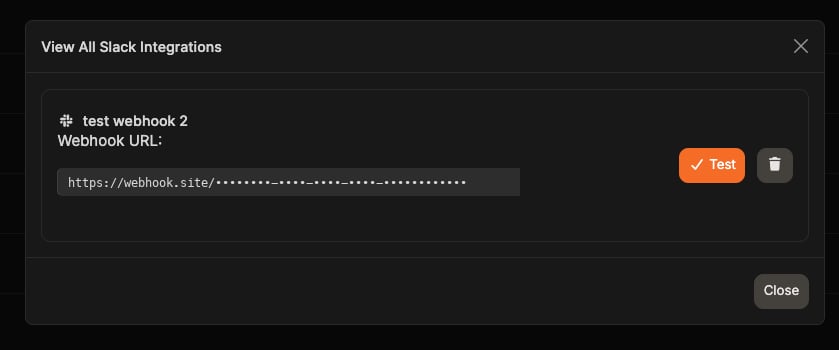
If you still have integrations on the deprecated Slack row, open **View All** to test or delete them:
## Prerequisites
* Admin access in Corgea
* Permission to create workflows in your Slack workspace
## Setting Up Slack Workflow Builder
Use Slack Workflow Builder so you can map Corgea **top-level** payload fields into a channel message.
Slack Workflow Builder only supports **top-level JSON keys**. Nested paths like `data.message` or `data.summary.total_issues` are **not supported** and commonly produce HTTP 400 `invalid_workflow_input`.
For `Type = Slack` + a Workflow Builder URL (`hooks.slack.com/triggers/...`), Corgea flattens **only** `scan.started`, `scan.completed`, `scan.failed`, and `webhook.test` into a top-level payload. Map `message`, `pull_request_id`, `scan_url`, and `true_positive_count` — not nested `data.*`.
Other subscribed events on the same Slack webhook (for example `issue.status_changed` or `sla.violation`) still receive the nested envelope. Prefer scan lifecycle subscriptions for Workflow Builder, or use a Custom Body / non-Slack destination for those events.
1. In Slack, open your workspace menu
2. Go to **Tools → Workflow Builder**
3. Click **Create**
4. Choose **Webhook** as the trigger
5. Name the workflow and continue
1. Copy the Workflow Builder webhook URL (`hooks.slack.com/triggers/...`)
2. On the **Webhook** trigger step, **add variables** whose names match Corgea’s top-level keys (Slack does not auto-discover payload fields). Add at least: `message`, `pull_request_id`, `scan_url`, `true_positive_count`, `scan_id`, `event_type`, `project_name`, `status`, `branch`, `company`
3. Add a **Send a message** step (required — Corgea does not post to Slack by itself)
4. Use **Insert a variable** to insert those webhook variables into the message (typed `{message}` text will not work)
Example flat `scan.completed` body Corgea sends to Workflow Builder (nested `project`, `summary`, and `scheduled_scan_ids` are **not** included):
```json theme={null}
{
"event_id": "b2c3d4e5-f6a7-8901-bcde-f12345678901",
"event_type": "scan.completed",
"timestamp": "2025-01-15T15:45:00.000Z",
"message": "Scan completed for My Project (PR #42): 5 true-positive findings. View: https://app.corgea.app/project/proj-uuid-9012/?scan_id=scan-uuid-7890",
"scan_id": "scan-uuid-7890",
"scan_url": "https://app.corgea.app/project/proj-uuid-9012/?scan_id=scan-uuid-7890",
"scan_type": "full",
"pull_request_id": "42",
"true_positive_count": 5,
"status": "completed",
"branch": "feature/auth",
"project_name": "My Project",
"company": "comp-uuid-1234",
"run_id": "run-abc",
"engine": "corgea"
}
```
On `scan.failed`, the flat body also includes top-level `error` when present.
Start with `message` for a ready-to-send summary, then add `pull_request_id`, `scan_url`, and `true_positive_count` for PR triage.
Completed-scan `message` wording uses **true-positive** counts (not total issues):\
`Scan completed for {project} (PR #N): X true-positive finding(s) [(Y with fixes)]. View: {scan_url}`\
`Y with fixes` counts fixes only among those true-positive findings.
5. Finish and publish the workflow
1. Go to **Integrations → Webhooks**
2. Create a new webhook
3. Set **Type** to `Slack`
4. Enter a name and paste the Workflow Builder URL
5. Subscribe to `scan.completed` and/or `scan.failed` (optionally `scan.started`)
6. Under **Scan Event Filters** (optional):
* **Only pull request / merge request scans** — skip non-PR scans
* **Only completed scans with true-positive findings** — skip `scan.completed` when `true_positive_count` is 0 (`scan.failed` is unaffected)
7. Click **Create Webhook** and save the one-time secret key
8. Click **Test** to confirm delivery
## Test Webhook expectations
When you click **Test Webhook** on a Slack Workflow Builder destination, Corgea sends a flat sample like:
```json theme={null}
{
"event_id": "...",
"event_type": "webhook.test",
"timestamp": "2025-01-15T15:45:00.000Z",
"message": "This is a test webhook from Corgea",
"test": true,
"webhook_name": "My Slack Hook",
"company": "comp-uuid-1234",
"company_id": "comp-uuid-1234",
"scan_id": "00000000-0000-0000-0000-000000000000",
"scan_url": "https://app.corgea.app/project/example/?scan_id=00000000-0000-0000-0000-000000000000",
"scan_type": "full",
"pull_request_id": "123",
"true_positive_count": 2,
"status": "completed",
"branch": "main",
"project_name": "Example Project",
"run_id": "test-run",
"engine": "corgea"
}
```
`company` matches live scan events. `company_id` is the same value for older Test consumers. Non-Slack destinations receive the same fields nested under `data` in the usual envelope.
Expect:
* HTTP 2xx from Slack (not 400 `invalid_workflow_input`)
* A non-empty Slack message when you map the top-level `message` variable
* Variable names that match production scan events (so you can map PR # / scan link / TP count during Test)
## Notification Content
For Slack Workflow Builder (`Type = Slack` + `hooks.slack.com/triggers/...`), map these **top-level** fields:
| Field | Description |
| --------------------- | ------------------------------------------------------------------------ |
| `message` | Ready-to-send summary (PR #, TP count, scan URL when available) |
| `event_type` | e.g. `scan.completed`, `scan.failed`, `webhook.test` |
| `event_id` | Delivery event UUID |
| `timestamp` | ISO 8601 timestamp |
| `scan_id` | Scan UUID |
| `scan_url` | Deep link to the scan in Corgea |
| `scan_type` | Scan type string |
| `pull_request_id` | PR/MR number when this is a pull request scan (empty when not a PR) |
| `true_positive_count` | Non-deleted security findings excluding false positives and code-quality |
| `status` | `started`, `completed`, or `failed` |
| `branch` | Git branch |
| `project_name` | Project name |
| `company` | Company ID (same key as live scan payloads) |
| `company_id` | Same value as `company` (`webhook.test` only; not on live `scan.*`) |
| `run_id` | Scan run ID |
| `engine` | Scanner engine |
| `error` | Failure reason (`scan.failed` only, when present) |
| `test` | `true` on `webhook.test` only |
| `webhook_name` | Webhook display name (`webhook.test` only) |
`true_positive_count` matches the scan UI security count: excludes `status=false_positive`, `hold_reason=false_positive`, and `detected_by=code-quality`. Nested fields such as `summary`, `project`, `scheduled_scan_ids`, `scan_errors`, `created_at`, and `processed_at` remain available under `data` for Zapier/Other (and in delivery history), but are not flattened for Slack Workflow Builder.
## Compatibility notes
* **Zapier / Other:** still receive the nested envelope (`event_id`, `event_type`, `timestamp`, `data`), including `data.message`, `data.summary`, and the new triage fields under `data`.
* **Existing Slack Workflow Builder configs** that mapped nested `data.*` will not work — remap to top-level keys (`message`, not `data.message`).
* **Delivery history** in Corgea stores the nested envelope even when Slack receives a flat HTTP body.
* **Non-scan events** on a Slack WF webhook are not flattened; keep those on Zapier/Other or a Custom Body if you need usable Slack variables.
## Incoming Webhooks vs Workflow Builder
* **Recommended:** Workflow Builder URLs (`hooks.slack.com/triggers/...`) with a **Send a message** step. Corgea flattens `scan.*` and `webhook.test` for `Type = Slack`.
* **Incoming Webhooks** (`hooks.slack.com/services/...`): rejected on save unless you add a [custom body](/webhooks) whose rendered JSON has a top-level non-empty string `text` field (Slack fallback text; optional `blocks` are allowed alongside it). `{"text": "{{message}}"}` works only when the webhook is limited to `scan.started` / `scan.completed` / `scan.failed` / `scheduled_scan.daily_report` (`{{message}}` is empty for other events). Without a valid body, deliveries fail and the webhook can auto-pause.
## Managing Existing Slack Integrations
If you still have integrations on the deprecated Slack row, open **View All** to test or delete them:
 ## Customization Options
With Workflow Builder, you can:
* Route messages to different channels by severity or project
* Add reminders or follow-up steps
* Build conditional logic around scan results (for example, only notify when `true_positive_count` is greater than 0)
* Reuse the same payload variables across multiple actions
Prefer Corgea **Scan Event Filters** (PR-only + completed with findings) when you want to avoid noise from scheduled/full scans without a third-party flattener like Zapier.
## Additional Resources
* [Slack Workflow Builder Guide](https://slack.com/help/articles/360035692513-Guide-to-Workflow-Builder)
* [Flatten JSON for Workflow Builder](https://slack.dev/flatten-json-for-workflow-builder/)
* [Corgea Webhooks](/webhooks)
## Customization Options
With Workflow Builder, you can:
* Route messages to different channels by severity or project
* Add reminders or follow-up steps
* Build conditional logic around scan results (for example, only notify when `true_positive_count` is greater than 0)
* Reuse the same payload variables across multiple actions
Prefer Corgea **Scan Event Filters** (PR-only + completed with findings) when you want to avoid noise from scheduled/full scans without a third-party flattener like Zapier.
## Additional Resources
* [Slack Workflow Builder Guide](https://slack.com/help/articles/360035692513-Guide-to-Workflow-Builder)
* [Flatten JSON for Workflow Builder](https://slack.dev/flatten-json-for-workflow-builder/)
* [Corgea Webhooks](/webhooks)