> ## Documentation Index
> Fetch the complete documentation index at: https://docs.corgea.app/llms.txt
> Use this file to discover all available pages before exploring further.
# Notifications
> Stay informed about important security events with email and webhook notifications
## Overview
Corgea keeps you in the loop on important security events through **email** notifications, and forwards the same events to any **webhooks** you've subscribed, so you don't have to keep checking the platform.
There are two places to configure this:
* **Settings → Personal → Notifications** — which emails Corgea sends you.
* **Settings → Company → Notification defaults** — the starting point for everyone in the company. Company admins only.
## How It Works
Notification preferences follow a simple two-level model:
1. **Company defaults** — set by company admins, these apply to everyone in the company.
2. **Personal preferences** — each user can override the company default for their own emails.
If you haven't set a personal preference, you inherit whatever the company admin has configured.
Both pages save as you change them, confirming with a brief **Saved** indicator. There are no **Save** buttons.
These settings control **email only**. Webhook delivery is configured separately under **Settings → Automation → Integrations → Webhooks** and is not affected by anything on these pages. See [Webhook Delivery](#webhook-delivery) below.
## Company Defaults
**Settings → Company → Notification defaults**
This is where company admins decide what's turned on by default for the whole company.
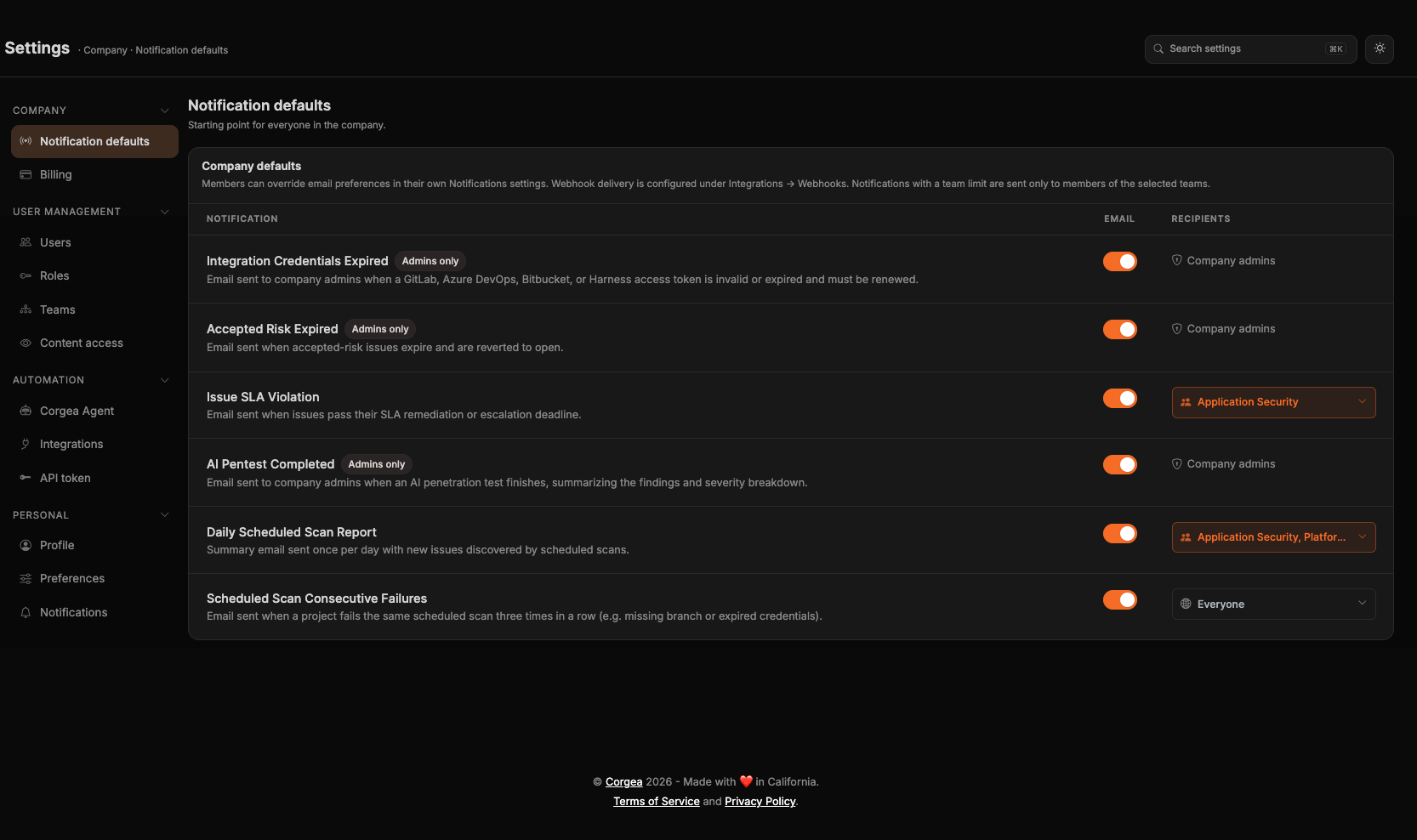 | Column | What it controls |
| -------------- | ------------------------------------------------------------------------------------------------------------------- |
| **Email** | Whether this notification is on by default for everyone. Members can still override it for themselves |
| **Recipients** | Who receives it. **Everyone in the company** by default, or pick specific teams so only their members get the email |
Notifications marked **Admins only** are sent solely to users with the company Admin role. They show **Company admins** in the Recipients column and cannot be limited to teams.
Limiting a notification to teams changes who receives the email. It does not change webhook delivery, and the people in scope can still set their own personal preference.
## Your Own Notifications
**Settings → Personal → Notifications**
Set each notification to **Inherit**, **On**, or **Off**. **Inherit** follows your company's default, which is what every notification starts on.
| Column | What it controls |
| -------------- | ------------------------------------------------------------------------------------------------------------------- |
| **Email** | Whether this notification is on by default for everyone. Members can still override it for themselves |
| **Recipients** | Who receives it. **Everyone in the company** by default, or pick specific teams so only their members get the email |
Notifications marked **Admins only** are sent solely to users with the company Admin role. They show **Company admins** in the Recipients column and cannot be limited to teams.
Limiting a notification to teams changes who receives the email. It does not change webhook delivery, and the people in scope can still set their own personal preference.
## Your Own Notifications
**Settings → Personal → Notifications**
Set each notification to **Inherit**, **On**, or **Off**. **Inherit** follows your company's default, which is what every notification starts on.
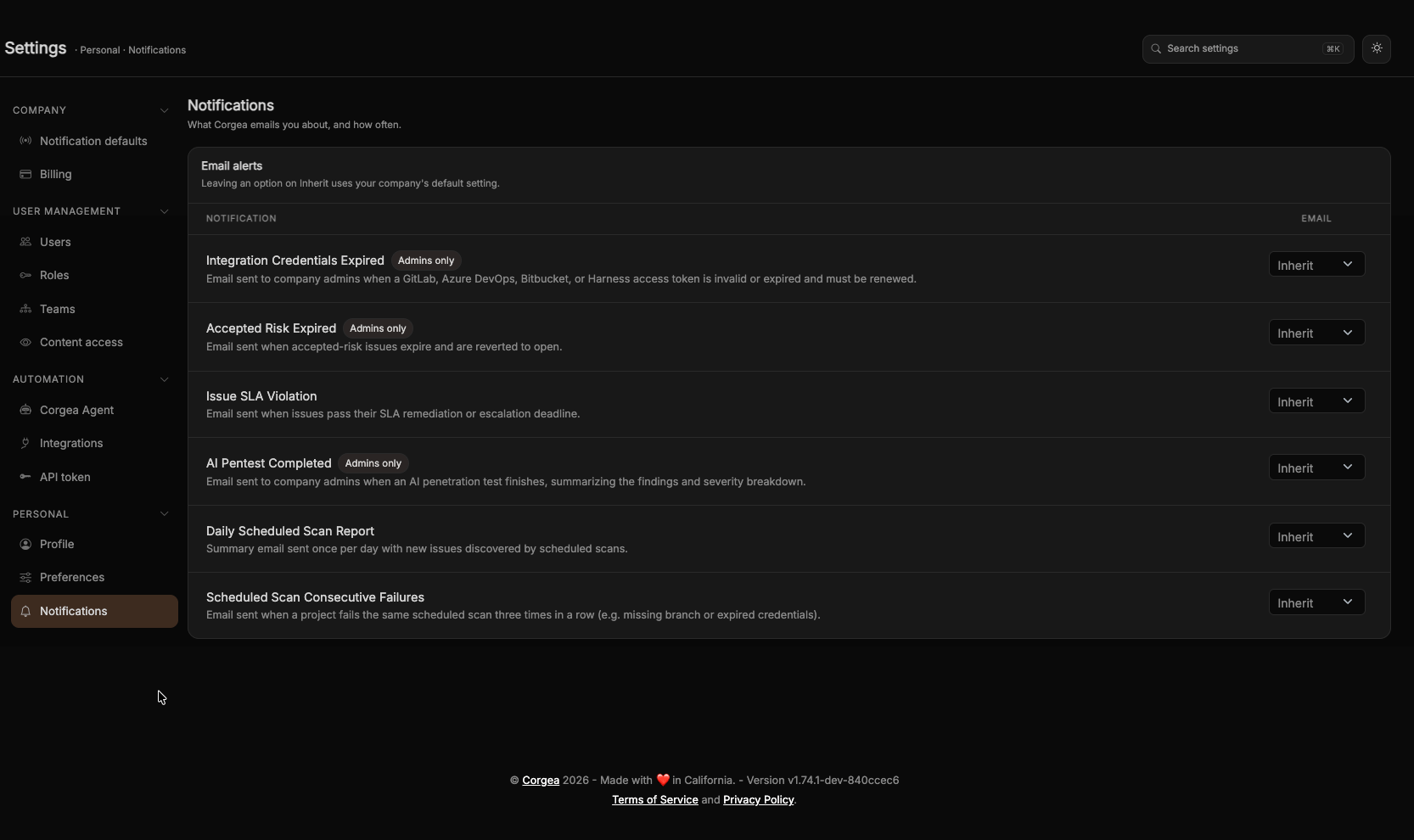 Every user has this page, including users who aren't company admins.
Webhook Delivery
Every notification listed below has a matching webhook event. A webhook receives the event whenever it is subscribed to it — there is no per-notification webhook switch, and email preferences have no effect on webhook delivery.
Set up a webhook under **Settings → Automation → Integrations → Webhooks**. See [Webhooks](webhooks) for the event list, payload schemas, and delivery history.
## Available Notifications
Daily Scheduled Scan Report
A daily summary email sent when scheduled scans have run, listing new issues found across all scan runs in the last 24 hours.
* **Who receives it:** All users in the company
* **Email default:** On
* **Recipients:** Company admins can limit delivery to selected teams
* **Webhook event:** `scheduled_scan.daily_report`
For the payload, see [Webhooks](webhooks#scheduled-scan-daily-report).
Scheduled Scan Consecutive Failures
Sent when a project fails the same scheduled scan three consecutive times because of a persistent configuration problem, such as a missing branch, expired credentials, or invalid repository settings. Corgea sends one email for each failure streak and pauses automatic attempts for that project until you fix the problem and successfully retry it with **Run Now**.
* **Who receives it:** All users in the company
* **Email default:** On
* **Recipients:** Company admins can limit delivery to selected teams
* **Webhook event:** `scheduled_scan.failure`
See [Scheduled Scans](scheduled-scans) for help resolving scan failures and running a schedule again.
Issue SLA Violation
Sent when one or more issues pass their remediation or escalation deadline as set in your [SLA Management](sla_management) configuration.
* **Who receives it:** All users in the company
* **Email default:** On
* **Recipients:** Company admins can limit delivery to selected teams
* **Webhook event:** `sla.violation`
Per-SLA webhook delivery is configured in [SLA Management](sla_management).
Accepted Risk Expired
Sent when an issue that was previously marked as "accepted risk" reaches its expiry date and is automatically reverted to open.
* **Who receives it:** Company admins only
* **Email default:** On
* **Recipients:** Company admins — cannot be limited to teams
* **Webhook event:** `issue.accepted_risk_expired`
AI Pentest Completed
Sent when an AI penetration test finishes, with a summary of findings and severity breakdown.
* **Who receives it:** Company admins only
* **Email default:** On
* **Recipients:** Company admins — cannot be limited to teams
* **Webhook event:** `pentest.completed`
Integration Credentials Expired
Sent when a GitLab, Azure DevOps, Bitbucket, or Harness access token connected to Corgea is invalid or expired and needs to be renewed.
* **Who receives it:** Company admins only
* **Email default:** On
* **Recipients:** Company admins — cannot be limited to teams
* **Webhook event:** `integration.credentials_expired`