> ## Documentation Index
> Fetch the complete documentation index at: https://docs.corgea.app/llms.txt
> Use this file to discover all available pages before exploring further.
# AI-native SAST
> Comprehensive vulnerability coverage in Corgea
## Overview
AI-native SAST is Corgea's next-generation code scanning solution, designed to detect and fix security vulnerabilities in application code, with a particular emphasis on business logic, authentication and code flaws. Unlike traditional Static Application Security Testing (SAST) tools, AI-native SAST uses advanced AI-driven techniques to enhance detection accuracy, reduce false positives, and provide actionable insights for developers and security teams.
By leveraging the power of Large Language Models (LLMs) combined with static analysis, AI-native SAST delivers a deeper contextual understanding of code, allowing it to detect vulnerabilities that standard SAST tools might miss. This document provides a technical overview of how AI-native SAST works, what it can detect, and how it integrates into development workflows.
## Key Features
* Combines the reasoning capabilities of LLMs with static code analysis
* Accurately detects vulnerabilities with contextual understanding
* Identifies both business logic and traditional SAST vulnerabilities
* Low false positive rate reduces noise in scanning results
* Actionable insights with clear explanations
* Seamless integration with CI/CD pipelines and pull requests
* Business logic vulnerability detection
* Authentication and authorization flaws
* Comprehensive vulnerability detection across multiple categories
## Vulnerability Classes Detected
AI-native SAST excels at detecting business logic vulnerabilities, which are often missed by traditional SAST tools. Below are some of the specific vulnerabilities detected by AI-native SAST:
* **Broken Access Control (CWE-639)**: Missing authorization checks allowing unauthorized access
* **Insecure Direct Object References (CWE-639)**: Direct access to objects without proper authorization
* **Path Traversal (CWE-22)**: Directory traversal attacks accessing unauthorized files
* **Insecure Authorization (CWE-285)**: Weak access controls
* **Privilege Escalation (CWE-269)**: Improper privilege management
* **Missing Function Level Access Control (CWE-285)**: Unprotected administrative functions
* **SQL Injection (CWE-89)**: Unsanitized SQL queries allowing database manipulation
* **Command Injection (CWE-78)**: OS command injection vulnerabilities
* **Cross-Site Scripting (XSS) (CWE-79)**: Injection of malicious scripts into web pages
* **LDAP Injection (CWE-90)**: LDAP query manipulation
* **XML Injection (CWE-91)**: XML content manipulation
* **Code Injection (CWE-94)**: Dynamic code execution vulnerabilities
* **Expression Language Injection (CWE-917)**: Injection in expression languages
* **Template Injection (CWE-1336)**: Server-side template injection
* **Insecure Authentication (CWE-287)**: Missing MFA or insecure token management
* **Broken Authentication (CWE-287)**: Weak authentication mechanisms
* **Improper Session Management (CWE-384)**: Session ID mismanagement
* **Credential Management (CWE-255)**: Improper credential storage or transmission
* **Weak Password Requirements (CWE-521)**: Insufficient password complexity enforcement
* **Insecure Data Storage (CWE-311)**: Weak encryption or plaintext storage
* **Weak Cryptography (CWE-327)**: Use of broken or risky cryptographic algorithms
* **Insufficient Entropy (CWE-330)**: Predictable random number generation
* **Hardcoded Secrets (CWE-798)**: Embedded credentials
* **Sensitive Data Exposure (CWE-200)**: Information leaks
* **Improper Certificate Validation (CWE-295)**: SSL/TLS validation failures
* **Unhygienic Data Handling (CWE-20)**: Poor input validation
* **Improper Output Encoding (CWE-116)**: Inadequate output sanitization
* **Mass Assignment (CWE-915)**: Binding of request parameters to internal objects
* **XML External Entity (XXE) (CWE-611)**: XML parser vulnerabilities
* **Deserialization of Untrusted Data (CWE-502)**: Insecure object deserialization
* **Security Misconfiguration (CWE-16)**: Improper security settings
* **Default Configurations (CWE-1188)**: Use of insecure default settings
* **Missing Security Headers (CWE-693)**: Absence of protective HTTP headers
* **Verbose Error Messages (CWE-209)**: Information disclosure through errors
* **Directory Listing (CWE-548)**: Exposed directory contents
* **Business Logic Vulnerabilities (CWE-840)**: Flaws that allow users to manipulate or bypass critical processes
* **Code Logic Vulnerabilities (CWE-633)**: Errors in conditions or loops leading to unexpected behavior
* **Context Dependent Vulnerabilities (CWE-696)**: Time-based or state-dependent errors
* **Race Conditions (CWE-362)**: Uncontrolled timing/ordering of operations
* **Timing Attacks (CWE-208)**: Time-based information leaks
* **SSRF (CWE-918)**: Server-side request forgery allowing unauthorized internal requests
* **URL Redirection (CWE-601)**: Unvalidated redirects and forwards
* **DNS Rebinding (CWE-350)**: DNS-based SSRF attacks
* **Improper Logging (CWE-532)**: Sensitive data in logs
* **Insufficient Logging (CWE-778)**: Missing security event logging
* **Improper Error Handling (CWE-209)**: Information leaks in error messages
* **Improper Exception Handling (CWE-248)**: Security risks from poor exception management
* **Missing Audit Trail (CWE-778)**: Inadequate activity tracking
* **Malicious Code (CWE-506)**: Unauthorized harmful actions
* **Backdoors (CWE-288)**: Hidden access mechanisms
* **Time Bombs (CWE-511)**: Triggered malicious actions
* **Supply Chain Attacks (CWE-1357)**: Compromised dependencies or updates
* **Data Exfiltration (CWE-319)**: Unauthorized data transmission
* **Unethical Data Collection (CWE-359)**: Improper data gathering
* **Malicious Network Activity (CWE-293)**: Suspicious connections
* **Crypto Mining (CWE-400)**: Unauthorized resource usage
* **Resource Exhaustion (CWE-400)**: Denial of service through resource consumption
In addition to business logic vulnerabilities, AI-native SAST can also detect common security flaws found in regular SAST scanning, covering approximately **900 Common Weakness Enumerations (CWEs)**.
Corgea also provides comprehensive secret scanning capabilities to detect hardcoded credentials, API keys, and sensitive data. Learn more about secret detection and secure storage alternatives.
## Comprehensive Vulnerability Coverage
Corgea's AI-native SAST provides extensive vulnerability coverage that goes beyond industry standards like the OWASP Top 10 and the Top 25 CWEs. Our platform continuously expands its vulnerability database to stay ahead of emerging threats and address a wide range of security issues across different programming languages and frameworks.
### Depth and Breadth of Coverage
Our vulnerability coverage spans multiple dimensions to ensure thorough analysis of your codebase:
Corgea understands the nuances of different programming languages and their unique security challenges. Our AI models are trained to identify vulnerabilities specific to each supported language, from memory management issues in C/C++ to dynamic typing challenges in Python and Ruby.
Popular frameworks introduce their own set of security concerns. Corgea's analysis accounts for the intricacies of frameworks like .NET, Django, Ruby on Rails, Gin, Express.js, and Spring, providing targeted vulnerability detection and remediation.
Beyond language-specific issues, our platform addresses vulnerabilities that can occur across multiple languages, such as:
* Insecure cryptographic practices
* Improper input validation
* Race conditions
* Authentication and authorization flaws
Our AI models are continuously updated to stay ahead of the curve, ensuring detection and remediation of new vulnerabilities as they emerge in the ever-evolving security landscape.
### Why Comprehensive Coverage Matters
Minimize the risk of security breaches, data leaks, and other potential threats by addressing a wide range of vulnerabilities
Meet industry-specific security requirements and regulatory standards, reducing the risk of non-compliance penalties
Streamline security review processes with AI-powered false positive detection and automated fixing capabilities
Stay protected as the security landscape evolves with continuously expanding vulnerability database and threat intelligence
## Endpoint Reachability Analysis
For eligible full AI-native SAST scans, Corgea supplements each finding with static endpoint reachability analysis. Corgea discovers the application's HTTP routes, resolves their handlers, and traces function calls from those handlers to the finding's source location.
A finding is **reachable** when Corgea identifies at least one static call path from a discovered endpoint to the vulnerable code. Each result can include the endpoint's HTTP method and path, the intermediate functions and files, code snippets, and the total path depth.
Reachability indicates that an endpoint can invoke code containing the finding. It does not prove that the finding is exploitable. Authentication, authorization, middleware, validation, runtime configuration, and data flow can still prevent exploitation.
Similarly, no reachability data does not prove that a finding is unreachable. Dynamic dispatch, runtime-generated routes, unresolved handlers, unsupported code patterns, or incomplete source context can prevent static analysis from finding a path.
### How the analysis works
Corgea detects the web frameworks in the repository and inventories routes with their HTTP methods, paths, handlers, source locations, and sub-projects where applicable.
Corgea indexes functions, methods, imports, and calls for supported application languages. Reachability currently analyzes eligible findings in Python, JavaScript, TypeScript, Go, Java, C#, and PHP.
For each eligible SAST finding with a source location, Corgea searches for static call paths from the relevant endpoint handlers to the finding.
When a path is found, Corgea associates the endpoint with the finding and stores the pathway steps, code locations, and depth for review.
Endpoint reachability is available when the feature is included in your plan and runs on full AI-native SAST scans. Results depend on support for the repository's language, framework, and routing patterns.
### Prioritize reachable findings
Open the findings for a completed full AI-native SAST scan.
Enable the **Reachable** toggle to show only findings with at least one endpoint-to-finding call path. The filter is preserved in the URL so you can bookmark or share the filtered view.
Select **Endpoint** to group findings by HTTP method and route. For monorepos, the sub-project is shown when available.
Each endpoint group shows its issue count and severity distribution. When call graphs are available, it also shows the maximum path depth and number of graphs. Expand a group to review its findings.
The Endpoint view can also list discovered endpoints without associated findings and group findings that have no associated endpoint under **No endpoints**.
### Inspect a finding's call paths
Select a reachable finding from the scan results, then click **Open Full View**.
Select the **Reachability** tab. Corgea displays a graph from the reachable endpoints, through intermediate functions, to the vulnerability target.
Endpoint nodes are blue, function nodes are green, and the vulnerability target is red. Click an endpoint or target node to highlight its connected paths. Use **Reset View** or **Center** to reposition the graph.
The pathway list shows the endpoint and depth. Use **Previous** and **Next**, or the left and right arrow keys, to move between multiple pathways. Expand a step to inspect its file, function, line number, and available code snippet.
Treat path depth as a description of the call chain, not a severity or confidence score. Use reachability to prioritize likely externally exposed findings, then review the finding's controls and [Taint Analysis](#reviewing-taint-analysis) to determine whether attacker-controlled data can reach the vulnerable operation.
## Reviewing Taint Analysis
For code issues where Corgea can identify a data flow, **Full View** includes a **Taint Analysis** tab. Use it to follow how untrusted data moves from its source through the application to the vulnerable sink, including flows that cross multiple files.
From a scan's issue list, click an issue row to open the issue details sidebar.
In the sidebar, click **Open Full View**. The Taint Analysis tab is available in Full View, not in the sidebar preview.
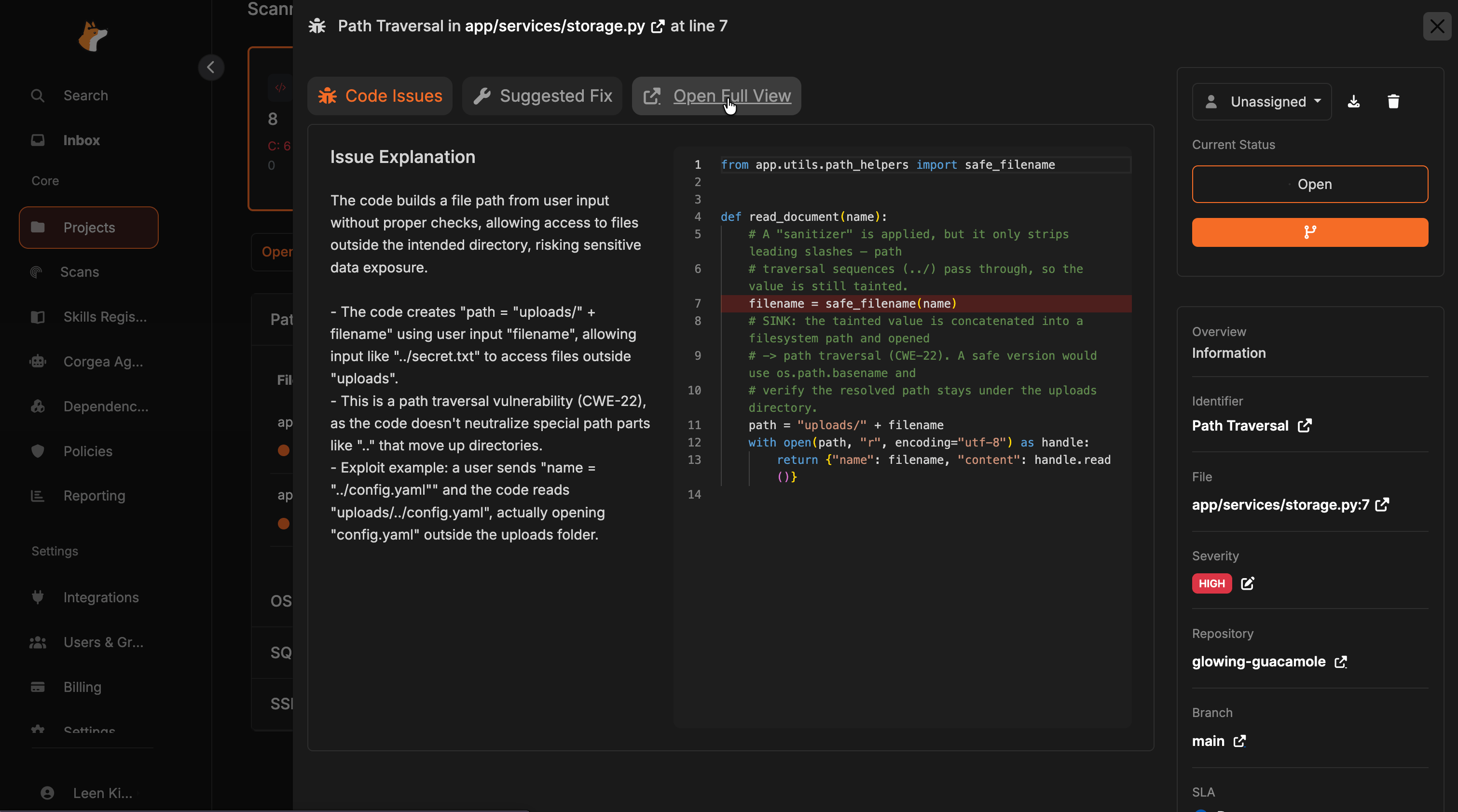 Select **Taint Analysis**. Corgea loads an ordered trace of the data flow. The first time you open the tab, generation may take a few seconds.
Each step shows its role, file path, line number, and a short description. Click a step to open that file in the inline code viewer and jump to the relevant line.
Select **Taint Analysis**. Corgea loads an ordered trace of the data flow. The first time you open the tab, generation may take a few seconds.
Each step shows its role, file path, line number, and a short description. Click a step to open that file in the inline code viewer and jump to the relevant line.
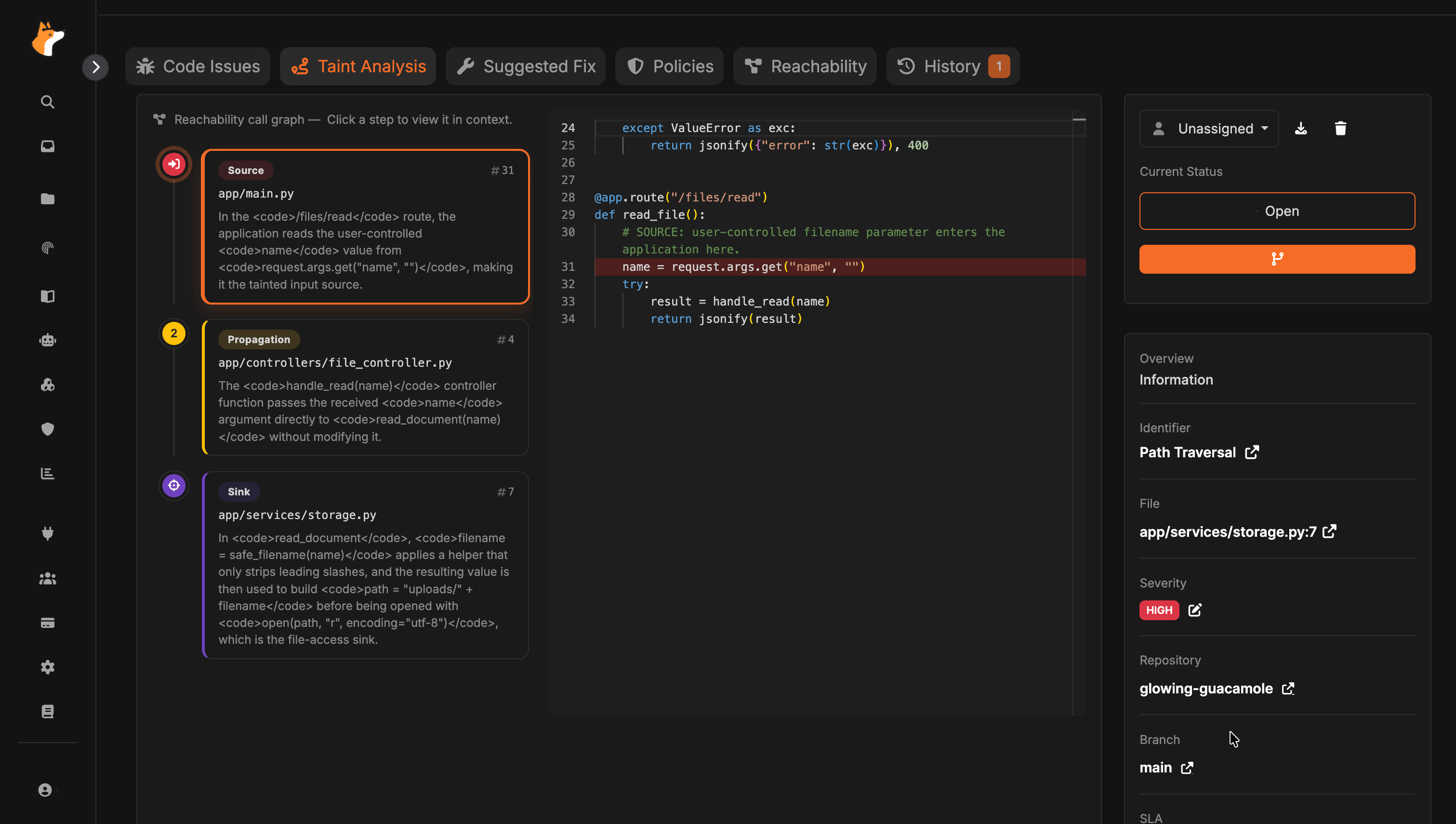 The trace is grouped into three step types:
* **Source** — where untrusted input enters the application
* **Propagation** — intermediate functions or files that pass the tainted value along
* **Sink** — where the data reaches the vulnerable operation
Depending on what Corgea has for the issue, the trace may come from scan-time data flow (for example from Semgrep, SARIF, or Checkmarx findings), a reachability call graph, or an AI-generated analysis when no scan-time trace is available. The tab header indicates which source was used.
## Technology Behind AI-native SAST
AI-native SAST is powered by Corgea's proprietary CodeIQ technology, combining AI with Abstract Syntax Trees (ASTs) for comprehensive analysis:
AI-native SAST parses the entire project to build a complete picture of code component interactions, ensuring no vulnerabilities are missed.
The AI engine understands code context, including middleware, configurations, and templates.
Context and logic understanding reduces false positives common in traditional tools.
### Comparison to Traditional Methods
Traditional static analysis techniques have significant limitations:
* Source-sink analysis misses validation steps
* Call-graphs miss runtime behaviors
* Vector search and RAG suffer from overgeneralization
## Integration and Workflow
* **CI/CD Pipelines**: Automatic scanning at commits/PRs
* **Pull Request Reviews**: Pre-merge vulnerability analysis
* **IDE Integration**: Real-time feedback during development
## Supported Languages and Frameworks
Corgea provides comprehensive support for scanning, false positive detection, and auto-fixing across multiple programming languages and their popular frameworks, covering approximately 900 Common Weakness Enumerations (CWEs).
### Language Support
**Native Language Support**: Robust support for C# language constructs, including LINQ, async/await patterns, and generics.
**Frameworks**: .NET, ASP.NET Core, Blazor
Corgea excels in securing enterprise-level .NET applications, addressing vulnerabilities like improper authentication, insecure deserialization, and CSRF.
**Native Language Support**: Analyzes Python-specific features such as decorators, context managers, and comprehensions.
**Frameworks**: Django, Flask, FastAPI
Focuses on both web applications and backend services, tackling issues such as SQL injections, XSS, and insecure direct object references.
**Native Language Support**: Understands Ruby's dynamic nature, including metaprogramming features and blocks.
**Frameworks**: Ruby on Rails, Sinatra
Specializes in identifying and fixing Ruby-specific vulnerabilities, including mass assignment issues, unprotected routes, and insecure file uploads.
**Native Language Support**: Analyzes Go-specific constructs like goroutines, channels, and interfaces.
**Frameworks**: Gin, Echo, Fiber
Targets Go-specific security concerns, such as race conditions, improper error handling, and insecure use of cryptographic functions.
**Native Language Support**: Supports both JavaScript and TypeScript, including features like async/await, closures, and TypeScript's type system.
**Frameworks**: Node.js, Express.js, Next.js, NestJS, Angular, React, Vue.js
Covers both client-side and server-side security, addressing issues like prototype pollution, insecure dependencies, and DOM-based XSS.
**Native Language Support**: Analyzes Java-specific features such as generics, annotations, and lambda expressions.
**Frameworks**: Spring, Jakarta EE, Play Framework
Focuses on enterprise Java ecosystems, tackling vulnerabilities such as XML external entity (XXE) attacks, LDAP injection, and insecure object deserialization.
**Native Language Support**: Handles PHP's unique syntax and language constructs, including traits and attributes.
Addresses common web application vulnerabilities like remote code execution, file inclusion vulnerabilities, and SQL injection attacks.
**Native Language Support**: Analyzes Kotlin-specific features including null safety, coroutines, and extension functions.
Specializes in Android and server-side application security, addressing issues like improper data exposure and insecure communication.
**Native Language Support**: Analyzes Swift-specific features including optionals, protocol extensions, generics, and value types.
Enhances security in iOS and macOS application development, addressing vulnerabilities like insecure data storage, improper SSL/TLS validation, and insecure inter-process communication.
**Native Language Support**: Analyzes Rust-specific constructs including ownership and borrowing, `unsafe` blocks, FFI boundaries, and error handling with `Result` and `Option`.
**Frameworks**: Axum, Actix Web, Rocket, warp
Targets the defects that safe Rust does not rule out, such as memory and ownership errors inside `unsafe` code and across FFI, reachable panics on untrusted input, integer truncation and release-mode overflow, SQL and command injection, and disabled TLS verification.
**Native Language Support**: Handles low-level programming constructs including pointers, memory management, and templates.
Focuses on memory-related vulnerabilities, buffer overflows, and system-level security issues common in C/C++ applications.
*Enabled for false positive detection and auto-fixing. Coming to scanning soon.*
### Key Capabilities
Advanced algorithms scan your codebase to identify potential security vulnerabilities, covering a wide range of CWEs
AI-powered system accurately distinguishes between genuine vulnerabilities and false positives
Provides actionable, context-aware fixes that can be applied automatically or reviewed before implementation
Understands the nuances of different frameworks within each language for targeted security insights
## Intelligent File Filtering
To optimize scan performance and accuracy, Corgea automatically excludes files that are not relevant to security analysis:
### Files We Skip
* Media files (images, videos, fonts)
* Style files (CSS, SCSS, LESS)
* Documentation and markdown files
* Configuration archives and compressed files
* Test files and test directories
* Mock and fixture data
* Code coverage reports
* Auto-generated code files
* Minified or bundled code
* Database migration files
* Type definition files
* Compiled binaries and build outputs
### Files Used for Context
While not directly scanned for vulnerabilities, Corgea may reference certain files to provide better analysis context, including README files, configuration examples, and application settings files.
### Custom Configuration
You can further customize scanning behavior using a `corgea.yaml` configuration file in your repository root:
```docs/corgea.yaml#L1-3 theme={null}
ignore_paths:
- "path/to/exclude/*"
- "legacy-code/*"
```
This allows you to exclude specific directories or file patterns based on your project's needs.
### Why We Filter
Our intelligent filtering approach:
* **Improves accuracy** by focusing on actual application code
* **Reduces noise** from test files and third-party code
* **Optimizes performance** for faster scan results
* **Prioritizes findings** in code you maintain
The trace is grouped into three step types:
* **Source** — where untrusted input enters the application
* **Propagation** — intermediate functions or files that pass the tainted value along
* **Sink** — where the data reaches the vulnerable operation
Depending on what Corgea has for the issue, the trace may come from scan-time data flow (for example from Semgrep, SARIF, or Checkmarx findings), a reachability call graph, or an AI-generated analysis when no scan-time trace is available. The tab header indicates which source was used.
## Technology Behind AI-native SAST
AI-native SAST is powered by Corgea's proprietary CodeIQ technology, combining AI with Abstract Syntax Trees (ASTs) for comprehensive analysis:
AI-native SAST parses the entire project to build a complete picture of code component interactions, ensuring no vulnerabilities are missed.
The AI engine understands code context, including middleware, configurations, and templates.
Context and logic understanding reduces false positives common in traditional tools.
### Comparison to Traditional Methods
Traditional static analysis techniques have significant limitations:
* Source-sink analysis misses validation steps
* Call-graphs miss runtime behaviors
* Vector search and RAG suffer from overgeneralization
## Integration and Workflow
* **CI/CD Pipelines**: Automatic scanning at commits/PRs
* **Pull Request Reviews**: Pre-merge vulnerability analysis
* **IDE Integration**: Real-time feedback during development
## Supported Languages and Frameworks
Corgea provides comprehensive support for scanning, false positive detection, and auto-fixing across multiple programming languages and their popular frameworks, covering approximately 900 Common Weakness Enumerations (CWEs).
### Language Support
**Native Language Support**: Robust support for C# language constructs, including LINQ, async/await patterns, and generics.
**Frameworks**: .NET, ASP.NET Core, Blazor
Corgea excels in securing enterprise-level .NET applications, addressing vulnerabilities like improper authentication, insecure deserialization, and CSRF.
**Native Language Support**: Analyzes Python-specific features such as decorators, context managers, and comprehensions.
**Frameworks**: Django, Flask, FastAPI
Focuses on both web applications and backend services, tackling issues such as SQL injections, XSS, and insecure direct object references.
**Native Language Support**: Understands Ruby's dynamic nature, including metaprogramming features and blocks.
**Frameworks**: Ruby on Rails, Sinatra
Specializes in identifying and fixing Ruby-specific vulnerabilities, including mass assignment issues, unprotected routes, and insecure file uploads.
**Native Language Support**: Analyzes Go-specific constructs like goroutines, channels, and interfaces.
**Frameworks**: Gin, Echo, Fiber
Targets Go-specific security concerns, such as race conditions, improper error handling, and insecure use of cryptographic functions.
**Native Language Support**: Supports both JavaScript and TypeScript, including features like async/await, closures, and TypeScript's type system.
**Frameworks**: Node.js, Express.js, Next.js, NestJS, Angular, React, Vue.js
Covers both client-side and server-side security, addressing issues like prototype pollution, insecure dependencies, and DOM-based XSS.
**Native Language Support**: Analyzes Java-specific features such as generics, annotations, and lambda expressions.
**Frameworks**: Spring, Jakarta EE, Play Framework
Focuses on enterprise Java ecosystems, tackling vulnerabilities such as XML external entity (XXE) attacks, LDAP injection, and insecure object deserialization.
**Native Language Support**: Handles PHP's unique syntax and language constructs, including traits and attributes.
Addresses common web application vulnerabilities like remote code execution, file inclusion vulnerabilities, and SQL injection attacks.
**Native Language Support**: Analyzes Kotlin-specific features including null safety, coroutines, and extension functions.
Specializes in Android and server-side application security, addressing issues like improper data exposure and insecure communication.
**Native Language Support**: Analyzes Swift-specific features including optionals, protocol extensions, generics, and value types.
Enhances security in iOS and macOS application development, addressing vulnerabilities like insecure data storage, improper SSL/TLS validation, and insecure inter-process communication.
**Native Language Support**: Analyzes Rust-specific constructs including ownership and borrowing, `unsafe` blocks, FFI boundaries, and error handling with `Result` and `Option`.
**Frameworks**: Axum, Actix Web, Rocket, warp
Targets the defects that safe Rust does not rule out, such as memory and ownership errors inside `unsafe` code and across FFI, reachable panics on untrusted input, integer truncation and release-mode overflow, SQL and command injection, and disabled TLS verification.
**Native Language Support**: Handles low-level programming constructs including pointers, memory management, and templates.
Focuses on memory-related vulnerabilities, buffer overflows, and system-level security issues common in C/C++ applications.
*Enabled for false positive detection and auto-fixing. Coming to scanning soon.*
### Key Capabilities
Advanced algorithms scan your codebase to identify potential security vulnerabilities, covering a wide range of CWEs
AI-powered system accurately distinguishes between genuine vulnerabilities and false positives
Provides actionable, context-aware fixes that can be applied automatically or reviewed before implementation
Understands the nuances of different frameworks within each language for targeted security insights
## Intelligent File Filtering
To optimize scan performance and accuracy, Corgea automatically excludes files that are not relevant to security analysis:
### Files We Skip
* Media files (images, videos, fonts)
* Style files (CSS, SCSS, LESS)
* Documentation and markdown files
* Configuration archives and compressed files
* Test files and test directories
* Mock and fixture data
* Code coverage reports
* Auto-generated code files
* Minified or bundled code
* Database migration files
* Type definition files
* Compiled binaries and build outputs
### Files Used for Context
While not directly scanned for vulnerabilities, Corgea may reference certain files to provide better analysis context, including README files, configuration examples, and application settings files.
### Custom Configuration
You can further customize scanning behavior using a `corgea.yaml` configuration file in your repository root:
```docs/corgea.yaml#L1-3 theme={null}
ignore_paths:
- "path/to/exclude/*"
- "legacy-code/*"
```
This allows you to exclude specific directories or file patterns based on your project's needs.
### Why We Filter
Our intelligent filtering approach:
* **Improves accuracy** by focusing on actual application code
* **Reduces noise** from test files and third-party code
* **Optimizes performance** for faster scan results
* **Prioritizes findings** in code you maintain